Live Event Setup
Recommended hardware for an in-person photo booth setup
Our tested device, stand, lighting, and hotspot recommendations for a physical booth station.
On this page
Every Snapbar experience is designed for mobile, but sometimes a physical photo booth setup is more ideal. These are our tested recommendations. Snapbar does not provide hardware rentals or staffing support, so order your gear a few weeks ahead.
First: Choose your device
Before purchasing a stand or lighting, make sure you have the right tablet. We recommend the 11 inch iPad Pro (generations 1 through 5).
Option 1: The complete setup with lighting (under $150)
Start with the 8.5 ft adjustable metal tripod. It acts as the base for all of the following parts.
Buy the metal tripod on Amazon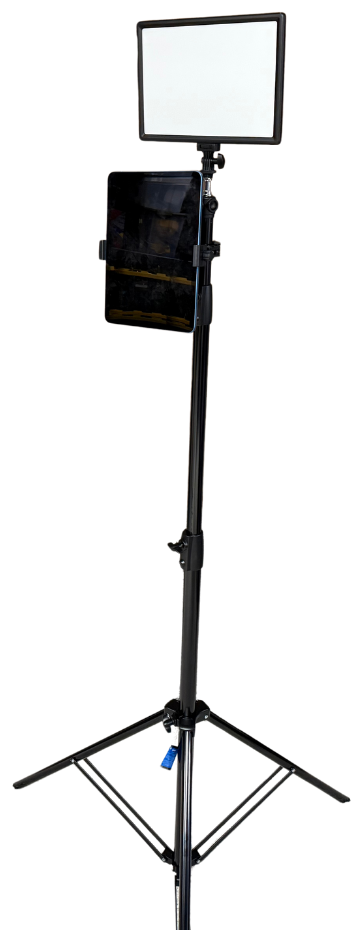
The complete setup: tripod, mounted LED light panel, pivoting pole clamp, and tablet holder. Mount the LED light panel on top for better, more consistent illumination and better photo outputs. It has adjustable brightness and color temperature, runs on a power cable, and includes a battery that lasts up to 90 minutes at full brightness.
Buy the mounted LED light panel on AmazonAttach the pivoting pole clamp to the tripod pole. The light occupies the top of the tripod, so the clamp is what holds your iPad on the pole itself.
Buy the pivoting pole clamp on AmazonGrip the iPad with the adjustable tablet holder and attach it to the clamp.
Buy the tablet holder on Amazon
Option 2: The streamlined setup, stand only
Use the 63 inch adjustable metal tripod as a lightweight, portable, stable base.
Buy the 63 inch tripod on AmazonScrew the adjustable tablet holder directly into the top of the tripod, using the standard quarter-inch thread, to hold your iPad securely.
Buy the tablet holder on Amazon
Internet and hotspot recommendation
Plan for at least 2 Mbps upload and download per device, and more headroom if you run multiple iPads at once.
If venue Wi-Fi is unreliable or unavailable, bring a dedicated 5G mobile hotspot. A member of our team has used the JEXtream 5G hotspot at events and it ran multiple iPads well.
View the JEXtream 5G hotspot
What to know
- Important note on newer iPads: Apple moved the front-facing camera to a horizontal orientation on the newest models, which makes them less ideal for photo booth purposes than the models recommended above.
- Option 1 is our standard recommendation: a cost-effective, minimalist, fully functional setup that combines a sturdy tripod with a powerful LED light panel for quality capture regardless of venue lighting. Option 2 is great when the venue is already well lit, or when the setup needs to be lighter and easier to transport.
- We recommend Neewer products because the brand has been reliable for us, but similar products from other brands work equally well. Prices and listings on Amazon may change.
- Some AI styles are quite good at fixing and adjusting for lighting. If you are unsure whether you need a light, ask Snapbar.
- A reliable internet connection is just as critical as the physical setup.
Tips
- Order everything early and assemble it once before event week, so on-site staff are not building furniture during setup.
- Pack spare cables, chargers, and a power strip with the kit.