Experiences
Get started with Spin to Win
Choose a play mode, set prize inventory, and prepare the wheel for your event.
On this page
Build your prize wheel under Experience. Confirm the prizes, quantities, and claim instructions before requesting launch.
Choose how guests play
Choose Create > Spin to Win and enter the event details. Select Next, then choose One device or Device + display.
In Experience > Play Mode, use One device when a guest enters and spins on the same phone or tablet. Use Device + display when guests join from their phones and spins appear on a shared screen.
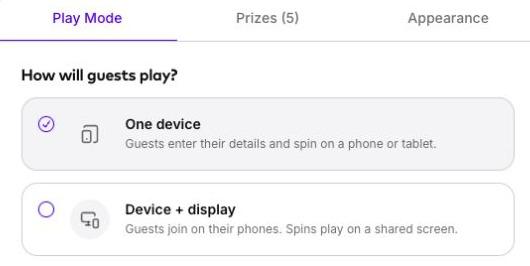
Choose a single-device flow or connect guest phones to a shared display.
Set prizes and appearance
Open Prizes and replace the starter prizes with your actual inventory. Set each label, tier, quantity, and relative weight. Blank quantity means unlimited, so enter a number for limited stock.
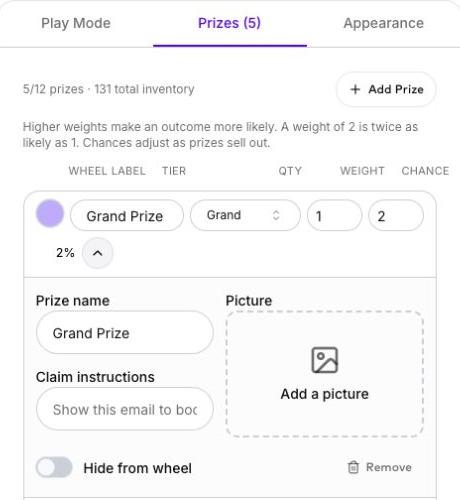
Set inventory and relative weights, then expand each prize for claim instructions. Expand a prize’s details to set its full name, picture, and Claim instructions. Check the no-win outcome too.
In Appearance, choose a wheel style, spin duration, confetti, and whether to show your logo in the center. Check the preview with your actual prize names.
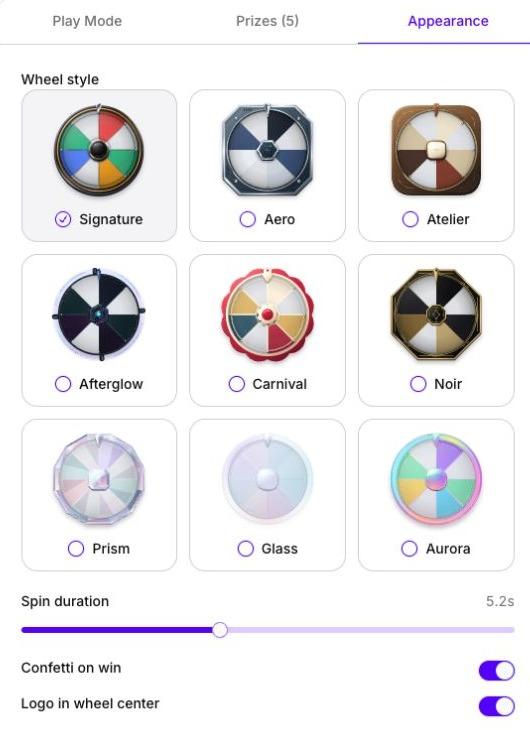
Preview wheel styles and adjust spin timing and celebration options.
Prepare for event day
Set guest fields and consent in Microsite, and review prize emails in Delivery. Save and request launch.
Rehearse with the event team before sharing the guest link. In Device + display mode, verify the shared screen and joining flow. Check Winners, Leads, and the prize claim process.
What to know
- Weights are relative: a weight of 2 is twice as likely as 1. Displayed chances change as prizes sell out.
- Spin to Win uses Winners instead of Submissions. Wheel and shared-screen setup live in Experience; it does not use the usual Sharing and Displays tabs.
Tips
- Keep wheel labels short; use the full prize name and claim instructions for details.
- Confirm who distributes prizes and where guests should collect them.